

Last Tuesday, I pulled up our blog’s Search Console data and saw something I couldn’t explain.
Impressions climbed 18% over three months. Clicks dropped 12%. Same posts. Same rankings. The traffic just… stopped converting into visits.
I didn’t panic. I opened ChatGPT, typed in one of our top-performing queries, and watched it cite three competitors.
Not us. Not once.
That’s what made me build this audit. Not a theory about where search is headed—a diagnostic checklist born from spending a full afternoon figuring out why our content was invisible to AI systems despite performing fine in traditional search.
Here’s what this post gives you: A step-by-step audit you can run on your existing blog in 2–4 hours, using mostly free tools, to find out whether AI search systems can actually read, extract, and cite your content.
What “AI Search Readiness” Actually Means for Your Blog
A blog that’s “AI search ready” isn’t one that’s been rewritten with fancy prompts or stuffed with new keywords.
It’s a blog where the answers are findable, the structure is parseable, and the technical setup doesn’t accidentally block AI crawlers.
That’s it. No mystery.
This audit sits inside a broader shift toward generative SEO, where visibility depends on how clearly content can be understood and reused by AI systems.
But you don’t need to understand the full landscape to run this check.
You just need to know what to look at.
Before You Start: The Verification Check
You need four things ready. Not optional—if you skip any of these, you’ll hit a wall mid-audit.
- Google Search Console access with full verification. View-only won’t cut it. You need the crawl stats report and URL inspection tool.
- Your robots.txt file open in a browser tab. Just type
yoursite.com/robots.txtand leave it there. - A list of 8–10 queries your blog should answer. Pull these from ChatGPT or Perplexity searches, not Google Keyword Planner. AI queries skew longer and more conversational than traditional keyword data suggests.
- A mobile device within reach. Desktop PageSpeed simulators miss roughly 40% of real-world performance issues. You’ll want the phone for one specific test later.
Got all four? Good. You’re ready.
Phase 1: Can AI Bots Actually Crawl Your Blog?
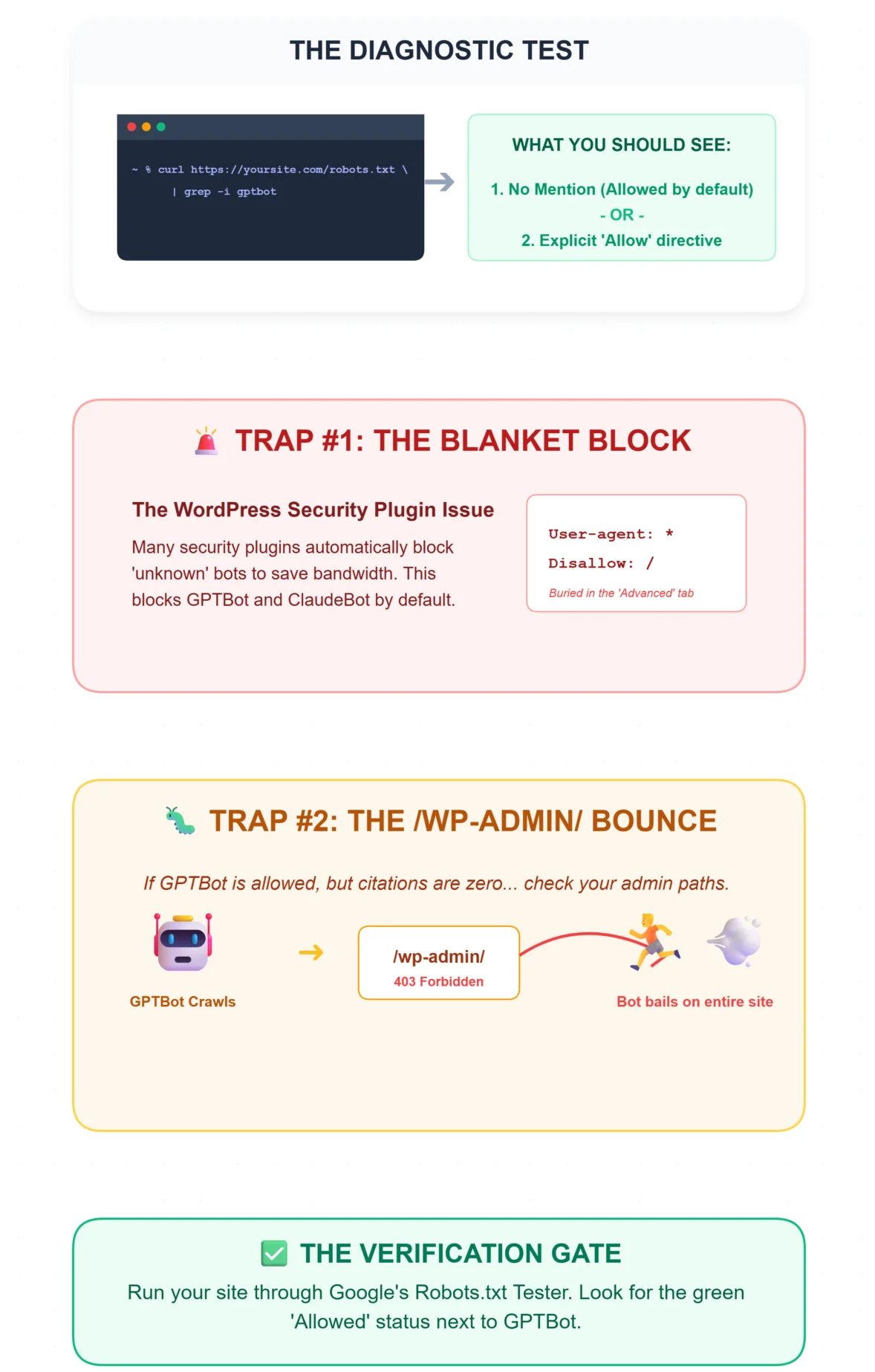
Open your robots.txt file. Search for GPTBot and ClaudeBot.
If you’re comfortable with terminal, this is faster: curl https://yoursite.com/robots.txt | grep -i gptbot
What you should see: Either no mention of these bots (which means they’re allowed by default) or an explicit Allow directive next to each.
What goes wrong: A surprising number of WordPress setups have security plugins that blanket-block unknown bots.
I spent an embarrassing amount of time troubleshooting one client’s site before realizing their security plugin had added a Disallow: / for every non-Google bot.
The setting was buried under an “Advanced” tab in the plugin dashboard—easy to miss, hard to undo if you don’t know it’s there.
One more thing. If your robots.txt explicitly allows GPTBot but you’re still getting zero AI citations, check whether /wp-admin/ is excluded.
AI bots sometimes hit admin paths first, get blocked, and bail on the entire domain.
Weird, but documented in multiple forums.
Verification: Green “Allowed” status next to GPTBot in any robots.txt testing tool. Google’s own tester works fine for this.
⚠️ The Accidental Blockade
Recent 2026 data shows that up to 28% of small business websites are accidentally blocking AI crawlers like GPTBot and ClaudeBot due to outdated firewall configurations or aggressive “anti-scraping” settings turned on by default in popular hosting panels. If you aren’t showing up in Perplexity or ChatGPT, this is the very first thing to check.
Phase 2: The Answer-First Check
This is where most blogs fail. And the fix is usually the simplest one in the entire audit.
Open your top 10 posts. For each one, read only the first 100 words.
Ask yourself: Does this section directly answer the query someone would type to find this post?
If the first paragraph is a story, a definition of something obvious, or a sentence that starts with “In this post, we’ll cover…”—that page is likely invisible to AI extraction.
One practitioner I know lost 70% of their traffic after AI Overviews rolled out.
The answer to their main query was buried in paragraph five.
They moved it into the first H2, and within weeks, Perplexity cited them in 80% of related queries.
Understanding how AI Overviews extract answers from content makes this pattern click.
AI systems don’t read your post like a human would—top to bottom, building context.
They scan for the clearest, most extractable answer near the top. If it’s not there, they move on.
The quick test: Paste your URL into Perplexity.ai and ask the query your post targets.
If Perplexity pulls a snippet from your page, you pass.
If it cites someone else or generates its own answer—your content isn’t extractable enough.
Verification: A bold, standalone answer visible within the first H2 section. No fluff surrounding it.
If your posts consistently fail this check, the issue isn’t just AI readiness—it’s structural.
A guide on improving blog clarity and rankings can help you rebuild those intros properly.
Phase 3: Structure Audit for Section-Level Intent Clarity
Open Screaming Frog or any crawler that reports heading hierarchy. Run it against your blog.
What you’re checking: Does each H2 address one clear idea? Or do your headings blend multiple concepts?
An H2 like “SEO Tips and Tools for Beginners” is doing two jobs.
AI systems flag this as drift—the section tries to answer two different questions, so it answers neither well enough to extract.
The rule I follow: Every H2 should be convertible into a single question.
If you can’t phrase it as one question, split it.
Also check that each section ends with a clear statement. Not a transition to the next section—a standalone summary sentence.
AI parsers use these as extraction anchors.
Verification: Your structure report shows single-intent H2s with no “drift detected” flags.
Each heading could stand alone as a mini-FAQ entry.
(I’ll be honest, I got stuck here too, until I realized that the problem wasn’t my headings—it was that I’d wrapped critical data in raw HTML tables without <figure> and <caption> tags. AI systems skipped them entirely. Wrapping lists and tables in proper <figure> elements with captions fixed the parseability issue overnight.)
Phase 4: Schema Markup Validation
Go to Google’s Rich Results Test. Paste in your blog post URLs one at a time.
What you should see: A blue “Valid Item” badge with parsed entities—Article type at minimum, FAQ if applicable.
What to watch for: The validator might show “Valid” while still missing fields that AI systems care about.
The biggest hidden error? Missing datePublished. Schema passes validation without it, but AI systems deprioritize undated content silently.
No error message. Just… nothing happens.
I watched a colleague spend days optimizing page speed for a client, completely ignoring schema.
When they finally tested in ChatGPT, zero content was being pulled. A two-hour FAQ schema fix produced immediate results.
Expect about 20–30% of your pages to get flagged for some kind of AI ineligibility issue on first pass.
That’s normal for a blog that wasn’t built with AI extraction in mind.
Verification: Clean schema validation without errors, datePublished present, and Article or FAQ type correctly identified.
💡 The “Freshness” Signal Requirement
Why is datePublished so critical? AI models like SearchGPT and Perplexity are actively trying to avoid hallucinating outdated answers. If your article schema lacks a clear publication or modified date, the AI engine will treat your content as “unverifiable chronologically” and skip it in favor of a competitor who clearly timestamps their data.
Phase 5: Topical Authority and Internal Link Check
This is where scattered content strategy shows up as a measurable problem.
Map your blog posts to topic clusters. You can do this in a spreadsheet—no paid tool required.
List every post, assign it to a topic bucket, and then check: do posts within the same bucket link to each other?
If you’ve been publishing across too many unrelated subjects, AI systems see your blog as shallow rather than authoritative.
The fix isn’t deleting content. It’s choosing focused blog topics that align with your business intent and linking related posts together with descriptive anchor text.
What breaks this: Generic anchors like “read more” or “click here.” These give crawlers zero entity context.
Every internal link should describe what the destination page is about.
One team I worked with had built solid topic clusters but no cross-links between them.
AI systems treated each post as isolated. Adding internal silo links between related posts caused a noticeable spike in topical authority signals within a few weeks.
Verification: Your cluster map shows 80%+ internal coverage. Posts within the same topic link to each other with descriptive anchors.
Phase 6: The Live AI Visibility Test
Query your core topics in ChatGPT and Perplexity. Note which results cite your domain.
What you want to see: Your domain in the top 3 sources with a pulled snippet.
What to expect realistically: Fresh content (under 6 months old) tends to rank lower in AI citations.
AI systems favor established authority. If your newer posts aren’t showing up, that’s not necessarily a failure—it’s a timing issue.
For bulk testing, Perplexity’s API lets you run multiple queries programmatically.
But for a first audit, manual checks on your top 10 target queries give you enough signal.
Verification: At least 3 of your top 10 target queries return your domain as a cited source in one or more AI systems.
The Stuff That Doesn’t Show Up in Guides
A few patterns I’ve seen that aren’t well-documented anywhere:
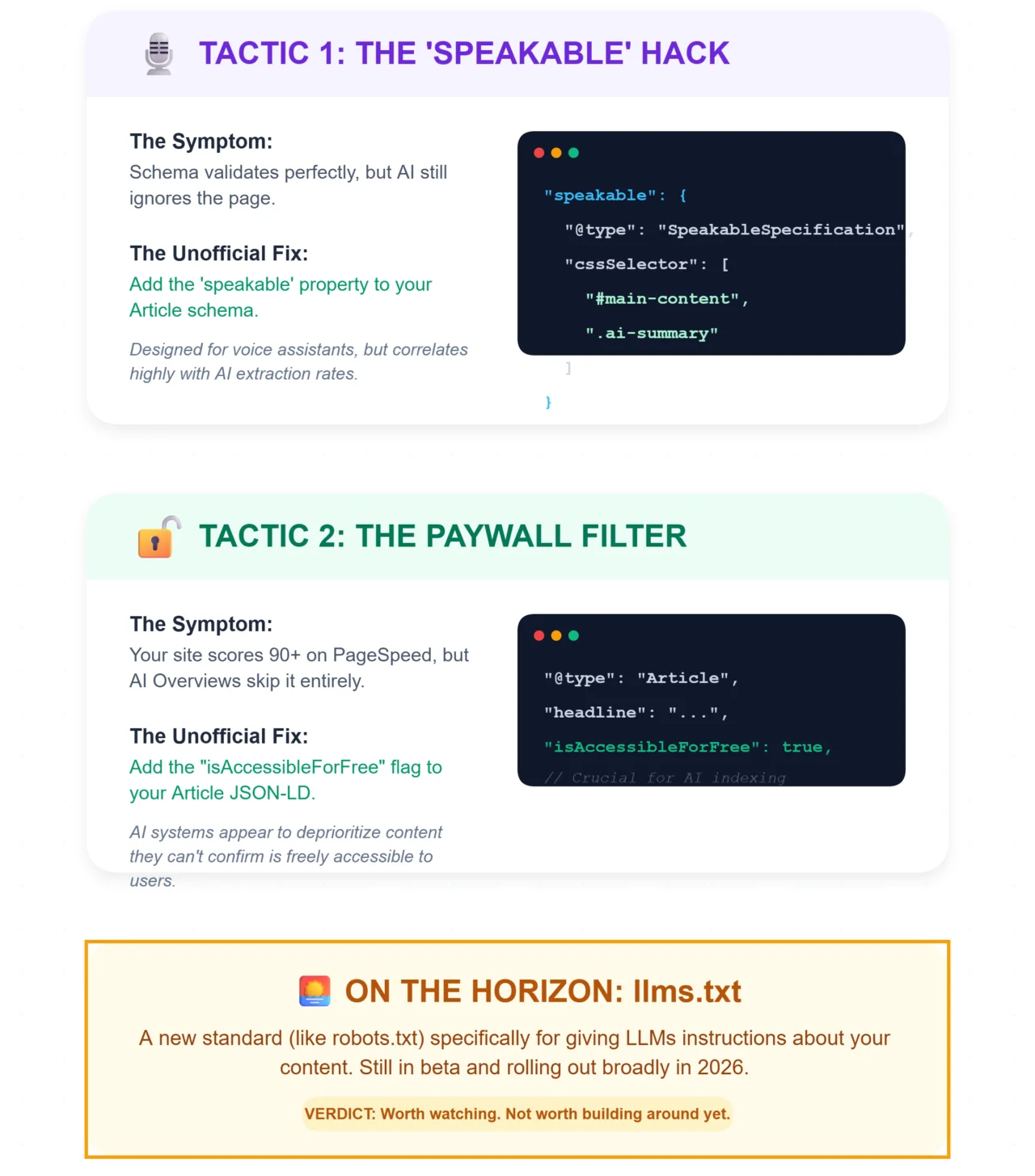
Schema validates perfectly, but AI still ignores the page. Adding the speakable property to your Article schema—designed originally for voice assistants—seems to improve AI extraction rates.
It’s not officially documented as a ranking factor, but the correlation is consistent enough that I include it now.
Your site scores 90+ on PageSpeed, yet AI Overviews skip it. Try adding "isAccessibleForFree": true to your Article JSON-LD.
AI systems appear to deprioritize content they can’t confirm is freely accessible.
And the emerging llms.txt standard—still in beta, rolling out more broadly in 2026—lets you give LLM-specific instructions about your content.
Worth watching, not worth building around yet.
What Happens After the Audit
If you’ve found structural issues across multiple posts, resist the urge to rewrite everything at once.
Pick your three highest-traffic posts. Fix the answer placement, clean up the heading structure, validate the schema.
Test again in two weeks.
For teams running 50+ posts and wanting to systematize this process going forward, tools like ButterBlogs handle the structural optimization—schema, heading hierarchy, answer-first formatting—during the writing phase, so you’re not retrofitting readiness after the fact.
FAQs
How often should I audit my blog for AI search readiness?
Run a full audit quarterly. Between audits, test any new post in Perplexity within 48 hours of publishing. If it’s not extractable fresh, the structure likely needs adjustment before indexing solidifies. Google’s Rich Results Test now includes an AI Extractability score—check it whenever you update schema.
Why does my schema validate but AI systems still ignore my content?
Valid schema doesn’t guarantee AI citation. The most common hidden issue is a missing datePublished field—validators pass it, but AI systems silently skip undated content. Add the speakable property to your Article schema and confirm datePublished is present. Then retest in ChatGPT or Perplexity.
Can I run this audit without paid tools?
Yes. Google Search Console, the Rich Results Test, your robots.txt file, and manual Perplexity queries cover about 80% of this audit. Screaming Frog’s free version handles up to 500 URLs. The only limitation is bulk testing—free API tiers cap the number of queries you can run at once.
Does ranking #1 on Google still matter if AI gives the answer?
It matters, but the relationship between ranking and actual traffic has shifted. You can hold the top position and still see clicks decline if AI Overviews answer the query directly. The audit helps you optimize for both—traditional rankings and AI citation—so you’re not choosing one over the other.
What’s the single highest-impact fix for most blogs?
Move your direct answer into the first 100 words under your primary H2. That one change—taking an answer buried mid-page and surfacing it—accounts for more AI visibility gains than any schema tweak or speed optimization I’ve seen. Start there.
Stop Auditing. Start Automating AI Readiness.
Don’t spend hours fixing broken schema and buried answers. ButterBlogs structures every post you write with AI-ready hierarchy, schema, and direct answers built in from the start.
✅ Auto-Generates Schema
✅ Enforces H2 Clarity
✅ Builds Topic Clusters